Generating modular dungeon wall and floor pieces in Blender
A kit of 92 indoor pieces on a 3 m grid, the ray checks that prove they fit together, and a tiling detail texture so a wall has grain up close.
I have a generator for the inside of a dungeon now. It makes a wall span, a floor square, a ceiling square, a door frame, a door leaf, a lift car and a light, all on the importer’s 3 m square, in four themes and two states. None of it is in the game yet. Everything here was built and checked in Blender.
Why build a kit?
The Breakout Site’s inside is flat faces made in code with a rusty material. Those are stand-ins, and this kit is what replaces the walls. The Breakout Site will use the cyberpunk theme. The other three themes (steampunk, eldritch and fantasy) are there to prove the same specs work in any theme.
The first build was 92 pieces. That’s 10 members in 4 themes and 2 states (new and decayed), plus 12 alternatives. A wall comes in three kinds and a floor in two so a long run doesn’t visibly repeat.
Sizing the detail from the camera
The kit reads the importer’s grid from the game’s code on every build: a 3 m square, a 4 m ceiling, an eye at 1.6 m, and the tallest monster of the largest size class plus the game’s margin. If the game’s numbers change, the pieces change.
I worked out what’s worth modeling from the camera. The party has a 70 degree vertical field of view on 1,080 pixels, so a thing h meters tall at d meters is about 771 h / d pixels:
| Detail | At 2 m | At 5 m | At 12 m |
|---|---|---|---|
| 2 cm gap between panels | 8 px | 3 px | 1.3 px |
| 4 cm stud | 15 px | 6 px | 2.6 px |
| 16 cm rib | 62 px | 25 px | 10 px |
So at 12 m only ribs, trims, beams and the color of whole panels show up. Chamfers and gaps are for 5 m and closer.
What did I keep and what did I throw away?
I compared one variable at a time on review sheets. What I kept:
- Walls come 10 cm into the room. I tried 4 and 20 cm and neither looked better straight on.
- Each span has 2 panels. One panel is a blank, and 3 or 4 look like bars.
- A rib sits on every seam, half on each piece. A seam inside a panel is invisible when new and breaks when the wall is worn.
- Every wall run is mitered at both ends, so I don’t need a corner piece or a T piece.
- The ceiling has a half beam on every edge. A flat ceiling lost.
- The light is in a fitting. A bare glowing bar looked the same at 12 m and worse up close.
- A door is a frame plus one leaf that’s placed twice, the second turned half around. Each leaf slides 1.25 m sideways.
- The bake is 512 px. A 256 px bake was blurry at 2 m and 1,024 px gained almost nothing.
Trim and the three wall variants looked the same as not having them on their sheets. I kept both because they cost no triangles.
Placing pieces and checking for gaps
The placing rule is short. Every open square gets a floor and a ceiling. A wall goes on every side of an open square that has rock beyond it, 1.5 m from the square’s middle with its front facing the square. A door’s square gets a frame and two leaves. Wall variants cycle by column plus row.
Each piece is one mesh with three levels of detail and one material, because my model pipeline refuses a second material on a placed piece. That’s why a light’s glow is an emission texture on the same material and not a second material. Each piece also has a piece.json saying what kind it is and what it’s fixed to (a line, a square, the ceiling, or across a doorway).
The checks run on five layouts in every theme and state: a corridor of twelve, a five by five room, a corner, a T, and a walk from a corridor through a door into a room. Rays are cast from eye positions. A ray that leaves the dungeon between two pieces is a gap, where light would leak. A ray that hits a face from behind is a hole. The doorway also has to pass a body 2.4 m wide and as tall as the tallest monster, because my rule is that monsters can follow you anywhere they can fit.
The run was 40 layouts and 2,088,384 rays with 0 gaps and 0 holes. All 92 pieces built twice to the same bytes and passed Godot’s import.
One thing I caught on a sheet: a worn wall loses some panels and has others crooked, and a worn seam piece had lost the panel on its seam. I added a seam sheet for that.
Why was a new wall blank up close?
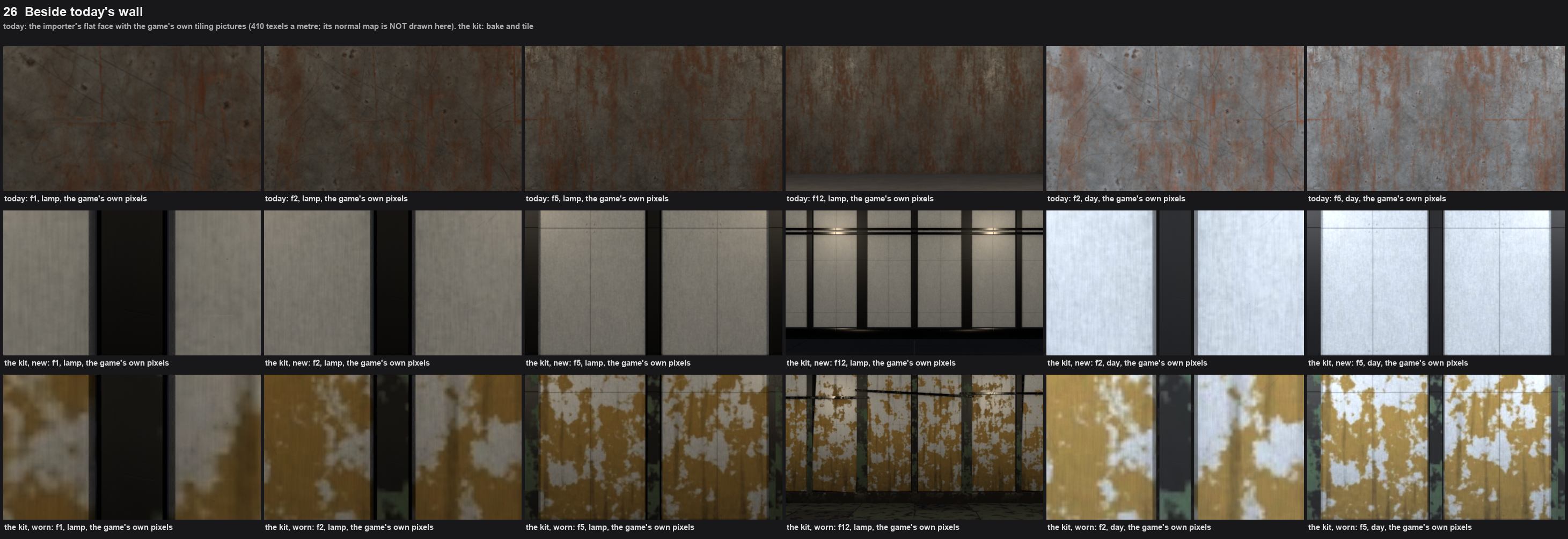
A piece has one 512 px texture, and on a wall that’s 73 texels per meter. The game’s tiling wall textures are about 410. The screen at 2 m shows 385 pixels per meter, so a new panel was a soft blank at 2 m and a stain was blotches a meter across. A 1,024 px bake doesn’t help because the paint has nothing finer to show.
The fix had to work without a second material, a second UV set or a change to the pipeline. So each theme now has one tiling set: a gray texture that the piece’s color is multiplied by, and a normal map. Both are 512 px square, and for cyberpunk they repeat every 1.5 m, which is 341 texels per meter. The set is projected under every piece of the theme, the same way the game already tiles its own walls.
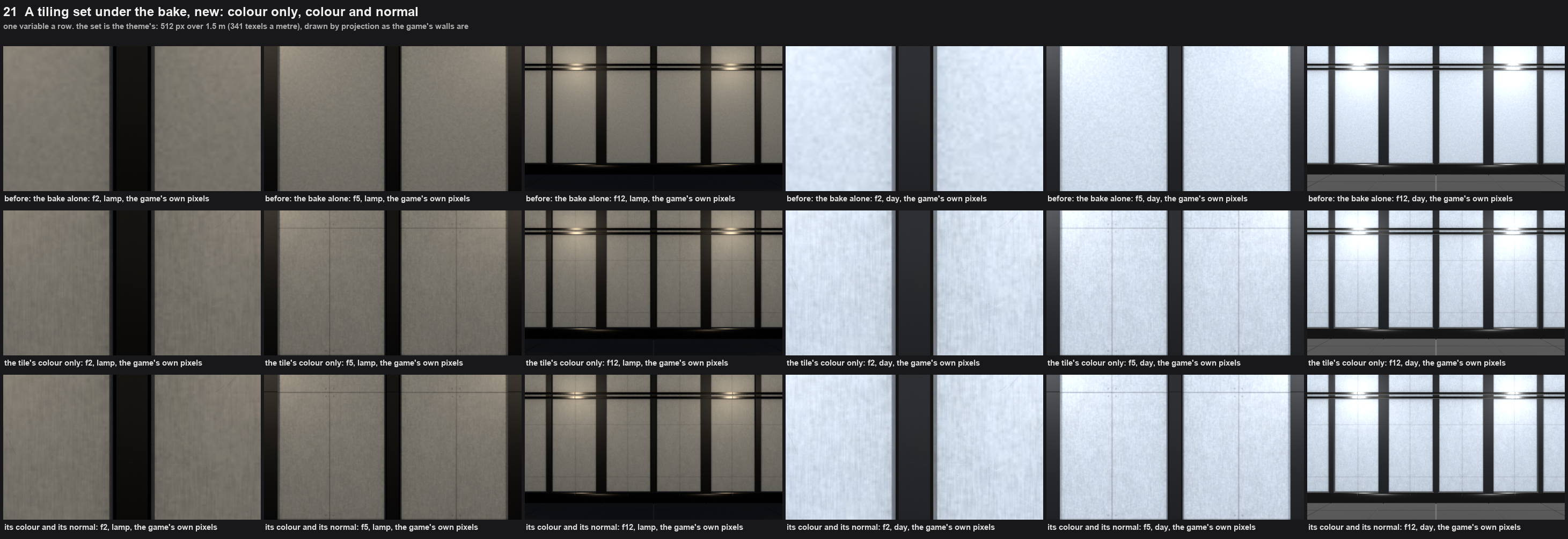
A new cyberpunk wall now shows brushed grain, a seam down the middle of each panel and screws at the crossings at 2 m.
Painting a tile that repeats
The tile is painted by a script in plain numpy and PIL, with no Blender. Each theme has a row of numbers: texture size, repeat length in meters, gray level, contrast, and the layers of a height field.
The height field is a sum of layers, and each layer is periodic so the tile repeats without a seam. The layers are grain (noise stretched one way, for brushed metal), peel, pits, scratches, seams, screws (four around each crossing of seams), cells and cracks. Noise is either made in the frequency plane with a Gaussian filter or drawn nine times so it wraps. Everything is seeded by the theme’s name, so the bytes are the same on every run. The normal map comes from the height field, exaggerated by 3 for cyberpunk and steampunk and 2 for the other two.
The tile has to match the grid. Cyberpunk’s tile is 1.5 m, half a square, and its seam is in the middle of the tile, so it falls in the middle of each of a span’s two panels. A tile that doesn’t match the grid shows seams crossing panels at random. I saw that on the sheet where the same tile was stretched over 3 m.
A piece’s model file doesn’t change. Its manifest gets a surface block with the set’s name, the tile length, blend: multiply, and whether the tile is in world space or object space. The door leaf and the lift car use object space so the tile moves with them.
How will Godot draw it?
I haven’t built this part. The plan is the detail layer on StandardMaterial3D:
material.detail_enabled = true
material.detail_blend_mode = BaseMaterial3D.BLEND_MODE_MUL
material.detail_uv_layer = BaseMaterial3D.DETAIL_UV_2
material.uv2_triplanar = true
material.uv2_world_triplanar = true      # for pieces fixed in the world
material.uv2_scale = Vector3.ONE / tile_m
That projects the set with no second UV set and no shader. When I build it I need to check that the detail normal gets its own tangents in the triplanar shader, that the tile lines up with the grid, and that the multiply happens in linear color. The tile’s gray is 0.97, so a piece should come out about 6% darker.
I also tried putting all ten members’ bakes into one 2,048 px texture per theme and state, which would cut 80 texture sets to 8. It looked the same but it saved nothing. It came to 10.33 MB against 9.15 MB, so I didn’t take it.
What’s still wrong?
- Nothing is installed in the game. One pipeline step asks which existing model a new one replaces, and whether these pieces can answer “none” is my decision to make. Until I do, none of them can be installed.
- A worn piece’s stain still has a soft edge at 2 m. A multiply can’t cut an edge, so the stain is still the bake’s 73 texels per meter.
- A multiply on black is black. Cyberpunk’s dark floor, ceiling and ribs look the same as before.
- The other three themes’ tiles are first guesses. Eldritch’s cells are heavy at 2 m, and fantasy’s pits barely show on its dark stone. Their palettes are loud too.
- Beams get lost under the lamps.
- I had a muted palette built beside the default, at half the saturation and 0.8 of the value, and I still need to pick one.