Fixing a dungeon floor from notes drawn in the game
Seven notes I drew on the Breakout Site became an NPC stuck in meat, laser walls, a false wall over a dug passage, failing lamps and lifts with doors.
I drew seven notes on the screen in the Breakout Site, and all seven are in the game now. An NPC is stuck in the meat up to her hips, the laser grids fill their openings, there’s a false wall with a dug passage behind it, the first floor’s lights are failing, and the lifts have walls and doors.
Holding an NPC in the meat up to the hips
Helena is an NPC who is half consumed by the meat, and now she looks like it. She’s stuck in the mass that was forced out of the burst vat, up to the hips, and she leans out of it at an angle. If the party kills her (she asks them to), her body keeps the lean and hangs limp over the meat.
Her dialog already said “It has my legs and most of my left side”, but she was standing upright on bare floor next to the meat. My note asked for her legs inside the blob with her torso and arms sticking out at an angle, and said clipping was fine.
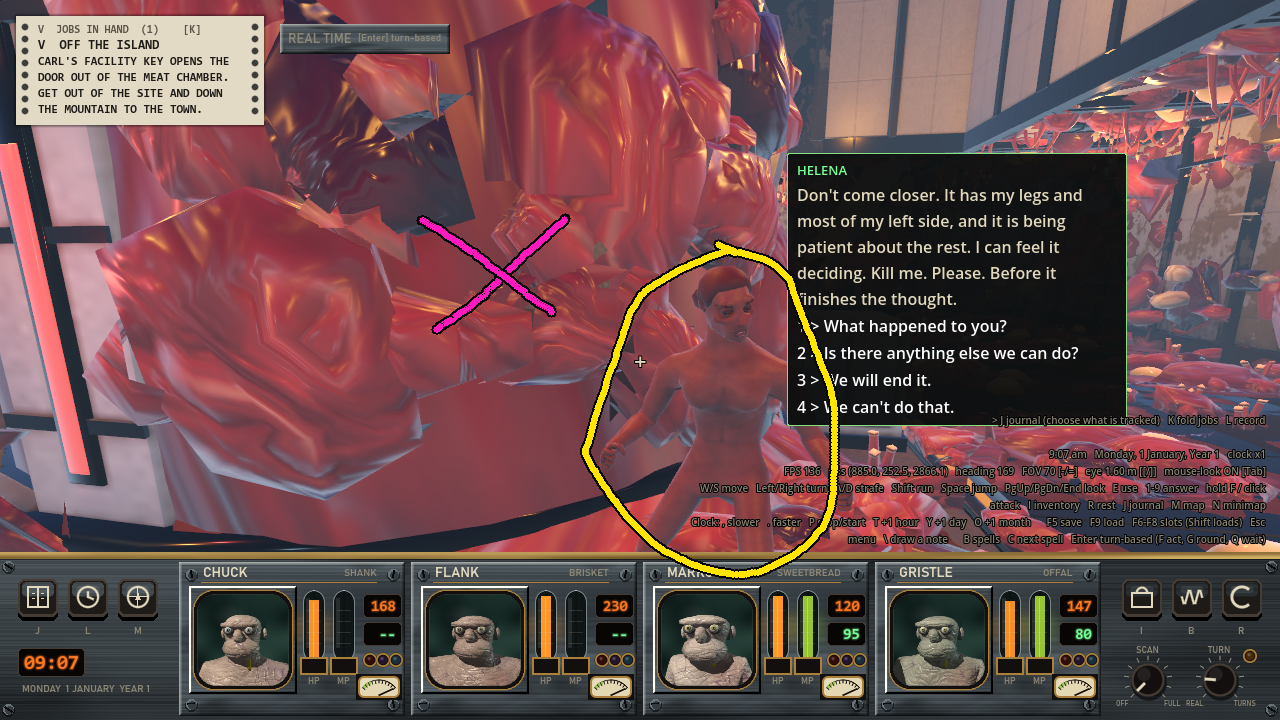
My note. The yellow circle is Helena standing on the floor, and the magenta cross is the lobe of meat she should be in.
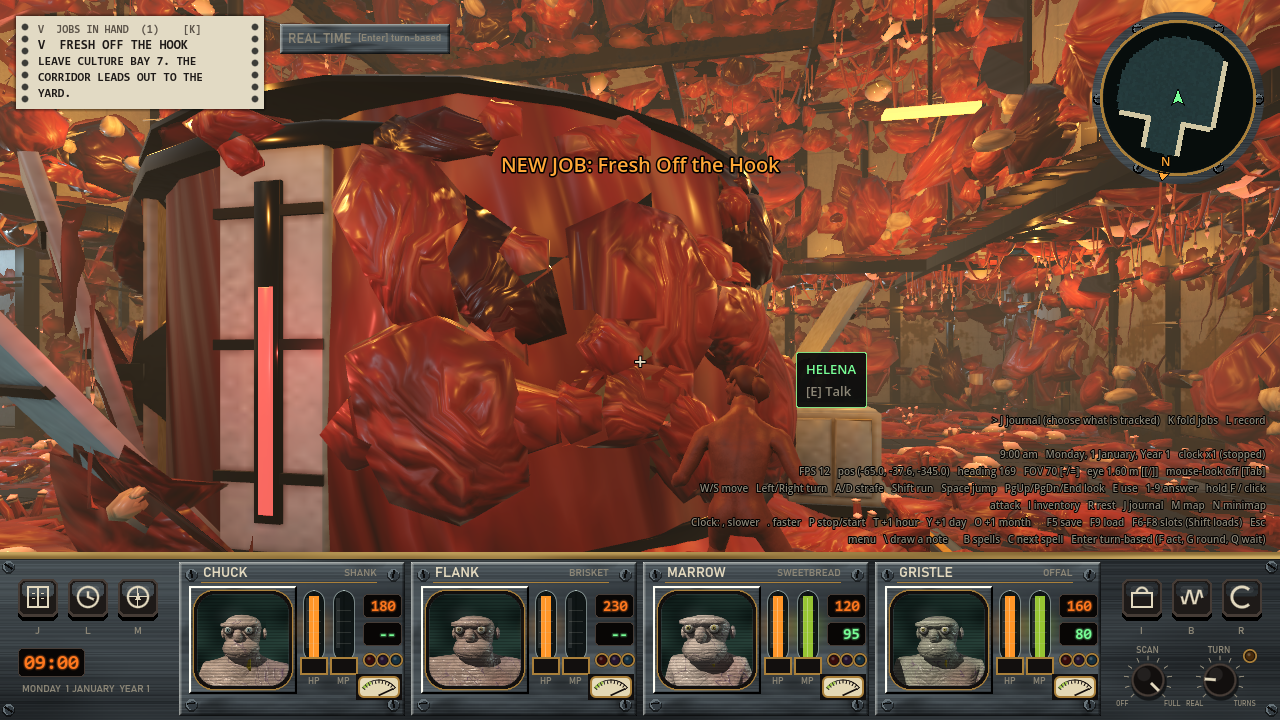
Before, from the spot where I drew the note.
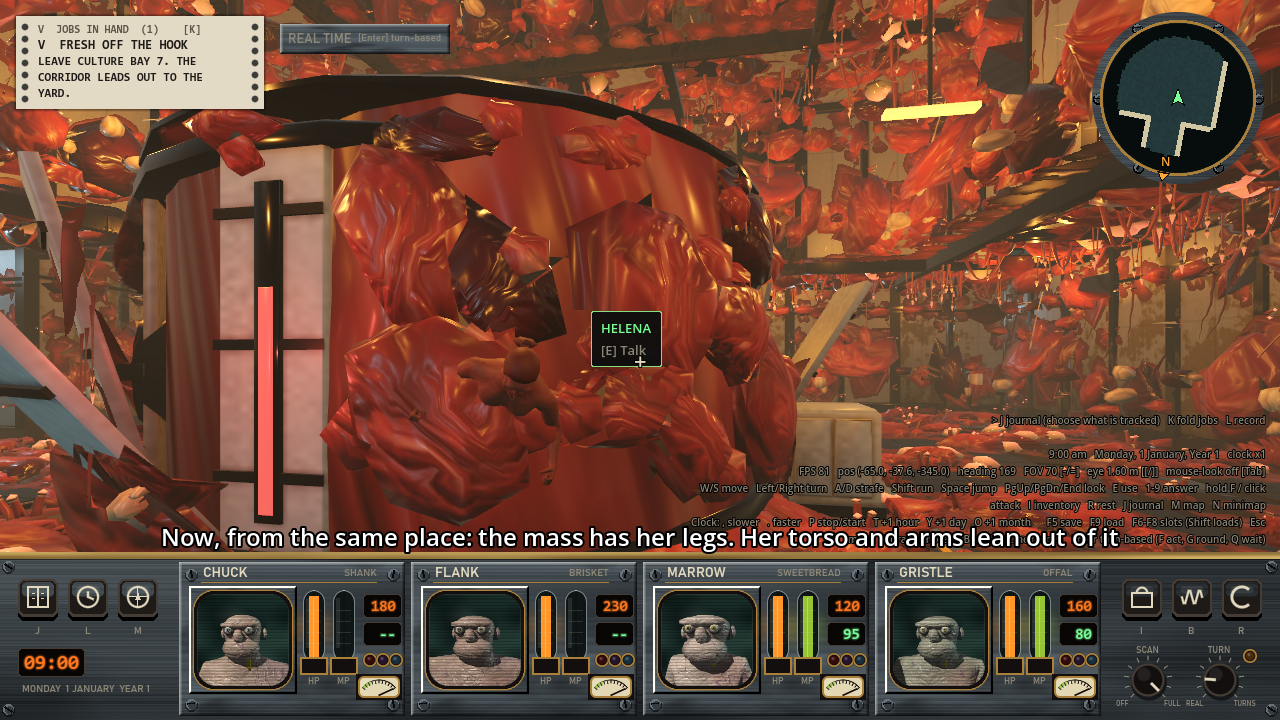
After, from the same spot. The meat has her legs, and her torso and arms lean out of it.
I didn’t want a special case for her, so any NPC row in a dungeon sheet can now take a held setting. It’s five numbers:
"held": {"at": [1.38, -0.17], "up": 1.3, "lean": 50, "turn": 325, "roll": 12}
at is where the hips go, in meters east and south of the middle of the square. up is the height of the hips above the floor. lean is how many degrees she tips forward from upright, turn is the compass bearing she faces, and roll tips her onto her left side.
The NPC node doesn’t move. It stays upright on its square, so her saves and the story checks about her work like before. Only the model moves. It’s rotated around the hips bone and the hips are placed at up, so everything below them ends up inside the meat. Her collision shape moves out to under her chest, and she doesn’t turn to face the party anymore.
I had no animation clip for the hang, so it’s a pose computed in code. Each bone is turned part of the way from where it is toward straight down: 0.14 for the spine, 0.2 for the chest, 0.4 for the neck and head, 0.92 for the upper arms and 0.97 for the forearms. The hands and fingers go back to their rest rotation. When she dies, the pose blends in from wherever her idle was over 0.9 seconds of game time, eased with a smoothstep. Loaded from a save, she’s hanging right away. Because the pose is worked out from her lean, changing lean or roll on the row changes the hang to match.
After watching the film I moved her up and to the right, into the gap between two lobes, so her arm wouldn’t go through the mound. The row is now at (1.2, -0.03) and 1.57 m up. Her right forearm is still 0.15 m inside the meat.
This one is only partly done. The pose has no weight shift and the arms don’t swing before they come to rest, so it’s a stand-in for a real clip. And an NPC with no skeleton can’t hang yet. It gets laid on its back like before.
Stringing laser beams across the whole opening
Laser grids now fill whatever opening they’re in, floor to ceiling. There’s also a new thing, a laser wall. It’s a semi-transparent red sheet that’s always on and stops the party, monsters, flyers, shots and the meat until a console turns it off.
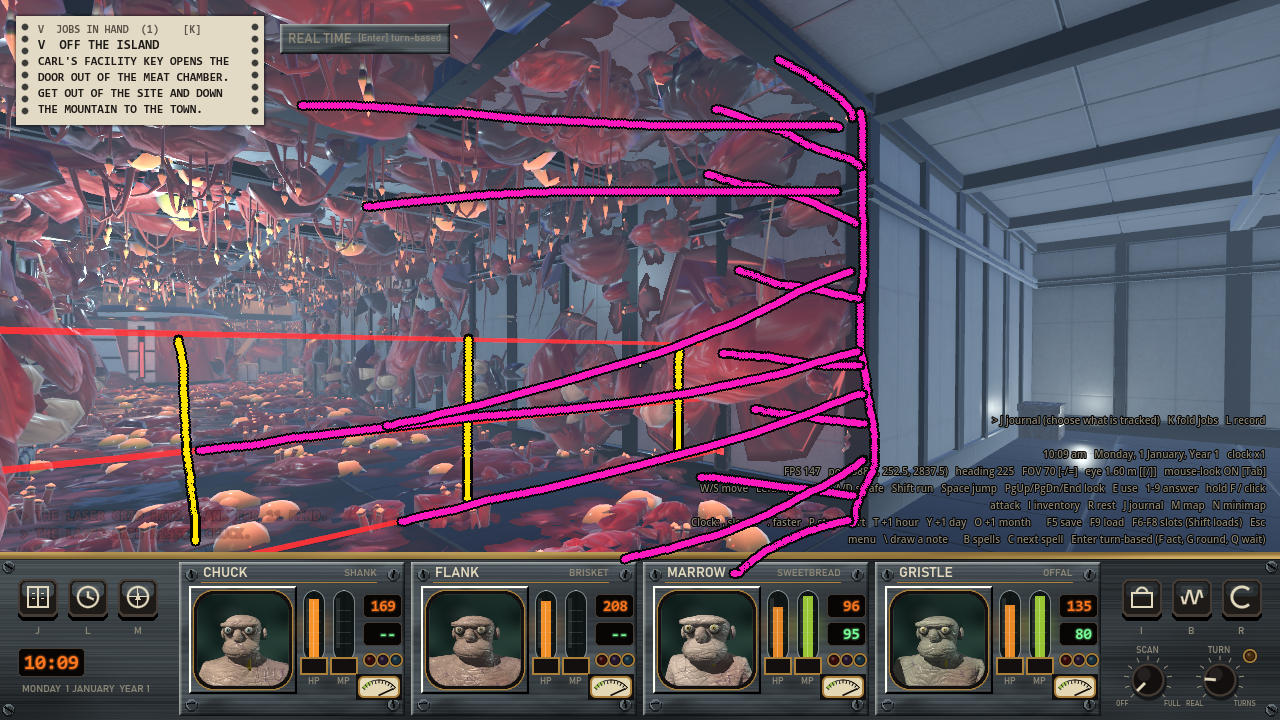
My note. Yellow is the three low beams the grid had, and magenta is the whole opening it should fill.
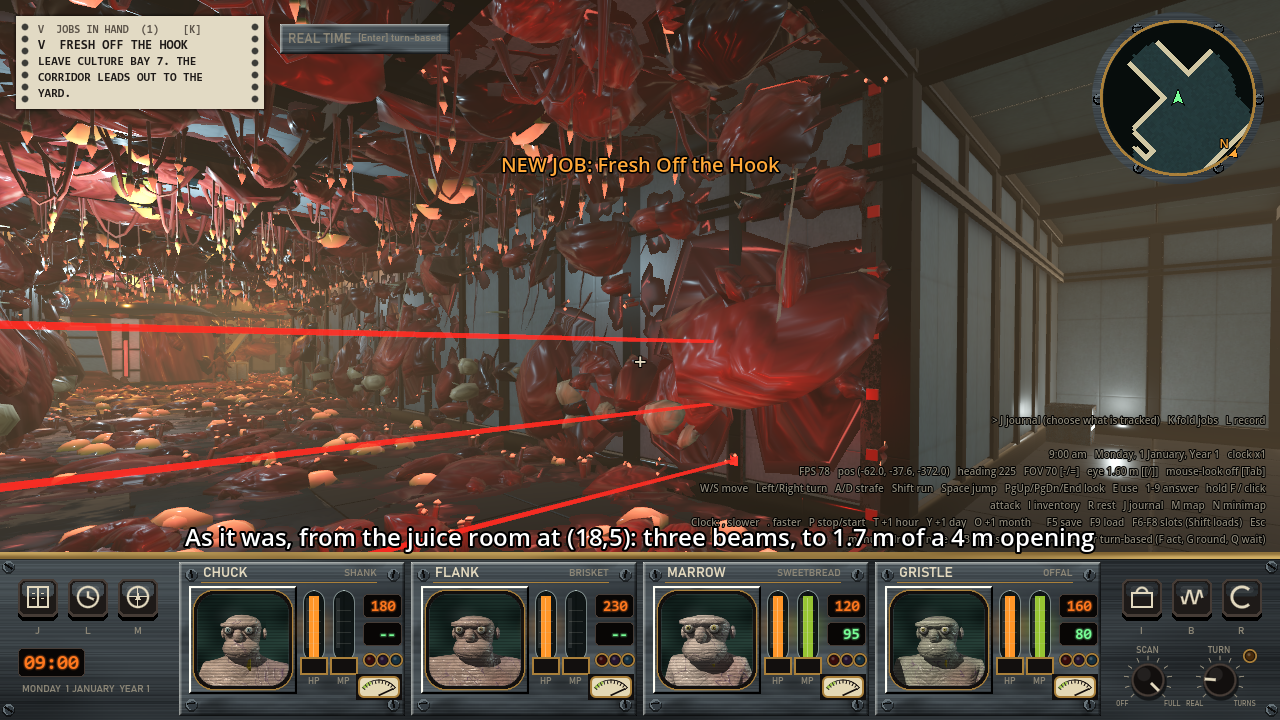
Before. Three beams reach 1.7 m up a 4 m opening, and the meat grows past them.
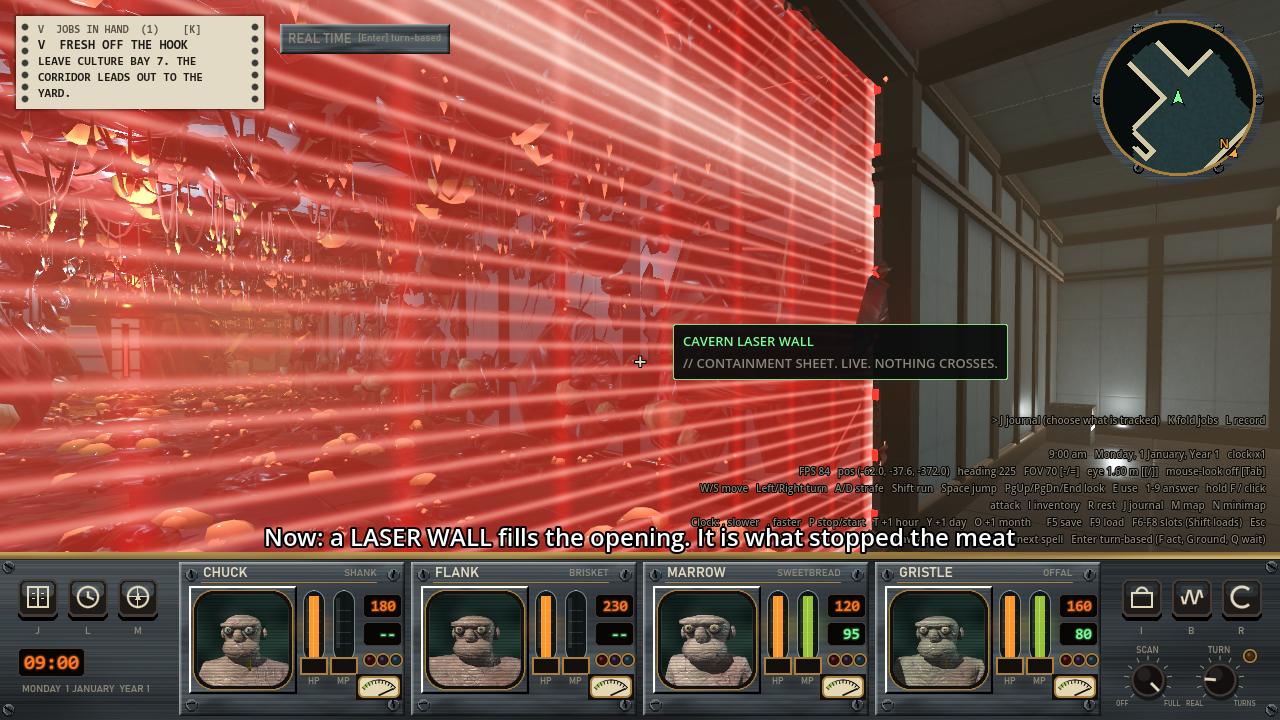
After, from the same spot. The laser wall fills the opening and you can see the cavern through it.
The grids used to have three beams at 0.5, 1.1 and 1.7 m no matter how tall the opening was. Now a function takes the opening’s height and returns the beam heights. The margin at the top and bottom is 0.3 m, or a fifth of the height if that’s smaller. The beams are evenly spaced, at most 0.6 m apart, and there are never fewer than three. A 4 m opening gets 7 beams and an 8 m one gets 14.
The laser wall is a fixture and not a new kind of trap, because it’s solid like a window or a grate and the importer already handles those. It’s a StaticBody3D with a box collider 0.24 m deep, an emitter post at each end, a rail along the floor and one under the ceiling, and a QuadMesh with an unshaded shader. The shader draws fine beams 0.1 m apart, a faint upright every 0.6 m and a bright band that climbs the sheet, with alpha clamped to 0.9. You can see through it but shots stop at it. Touching it does no damage and just writes one line to the log the first time. The wall saves nothing. Whether it’s on is the console’s flag, and the story’s save already keeps that.
The importer blocks every square the wall is strung across. It also adds up the meat on the squares in front and behind, and moves the wall to the edge on the cleaner side. The meat painter lets meat grow onto the wall’s squares and no further. That gives the juice vat’s room a reason to be clean. I’d said earlier it was because the doors were sealed, but that room has no doors.
The two grids in that room are laser walls now, and each one has a console in the room. The party wakes up inside that room. The east console needs nothing. The cavern console brings up a keypad and wants a code, and the code is on a duty card on a dead guard in the corridor behind the east wall. The importer’s reach check found that with only the east wall off, the party can walk to 646 of 648 squares, lift included. So the code opens a shortcut and doesn’t lock anything. I left it like that.
The meat doesn’t grow in when a wall goes off, the map doesn’t show a laser wall and the wall makes no sound. Those are for later.
Hiding a dug passage behind a false wall
The narrow way west out of the juice vat’s room is now closed off by a false wall. It’s a normal wall panel until the party touches it, and then it fades away for good. The passage and the small room behind it are rough dug rock.
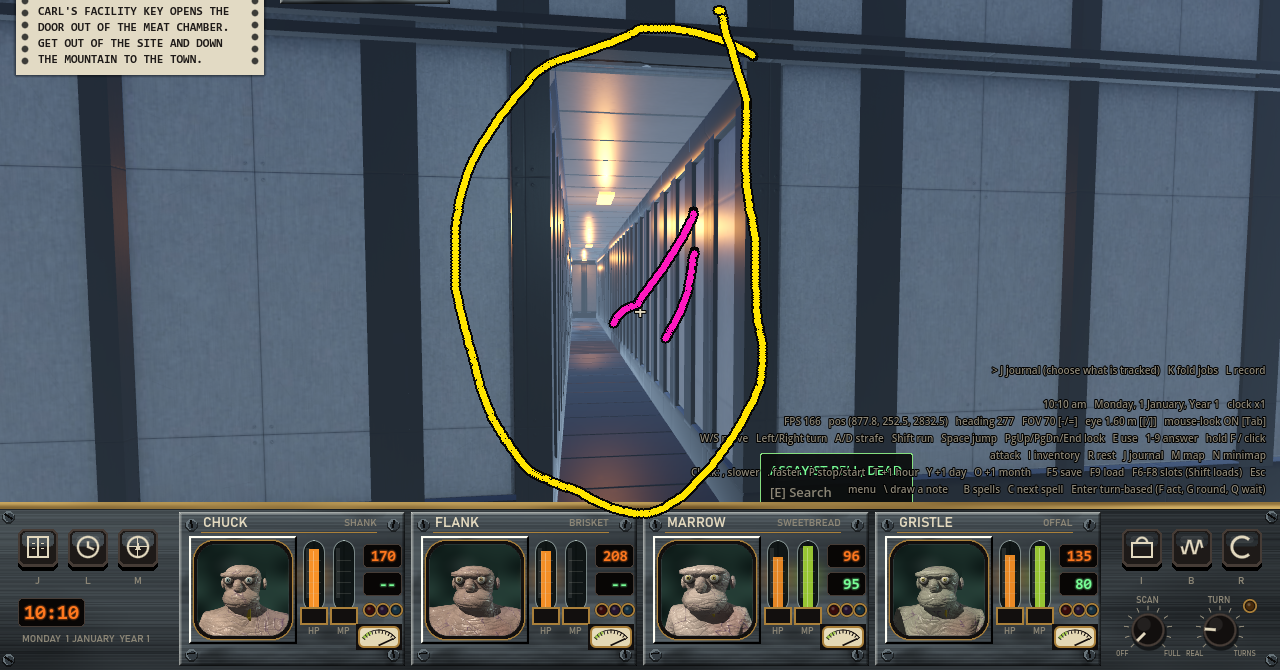
My note on the old build. The circled opening led into a built corridor with panels and lamps.
The false wall is the same wall piece the interior would have put on that side of the room, placed 0.01 m in front of the wall around the opening. It stops the party, monsters, sight and shots. The only sign is that it gets a name when the party is within 2.4 m and looking right at it. Using it starts a fade that takes 0.9 game seconds. Alpha goes down on a smoothstep, and a violet emission follows 0.35 * sin(f * PI), so it’s gone again by the end. My first version had that emission at 1.6 and it showed up as a loud purple wall.
The dungeon’s content file marks dug squares with rows of . and d, the same way it marks heights and meat. This floor has 27 of them. The rock is generated the way a cavern’s is, on cells a quarter of a square wide (0.75 m). Each corner of a wall is pushed into the solid rock by up to 0.66 m and never into the passage, so the passage is never narrower than the sheet says. Walls are upright to 2.2 m and only lean outward above that, and the ceiling is cut up into the rock by as much as 0.55 m. The same triangles go to the renderer and to physics.
Dug squares get no lamps. A dim violet light with a 7 m range hangs every third square. In the first film that light came through the false wall onto the room’s ceiling and gave the wall away, so now none of them is within 7 m of a built square.
Two smaller notes went in with this. The crawl into the first cell has a vent grate at each end, and each one is pulled off and saved separately. And every cell but one now has a dead prisoner in it that the party can eat for juice.
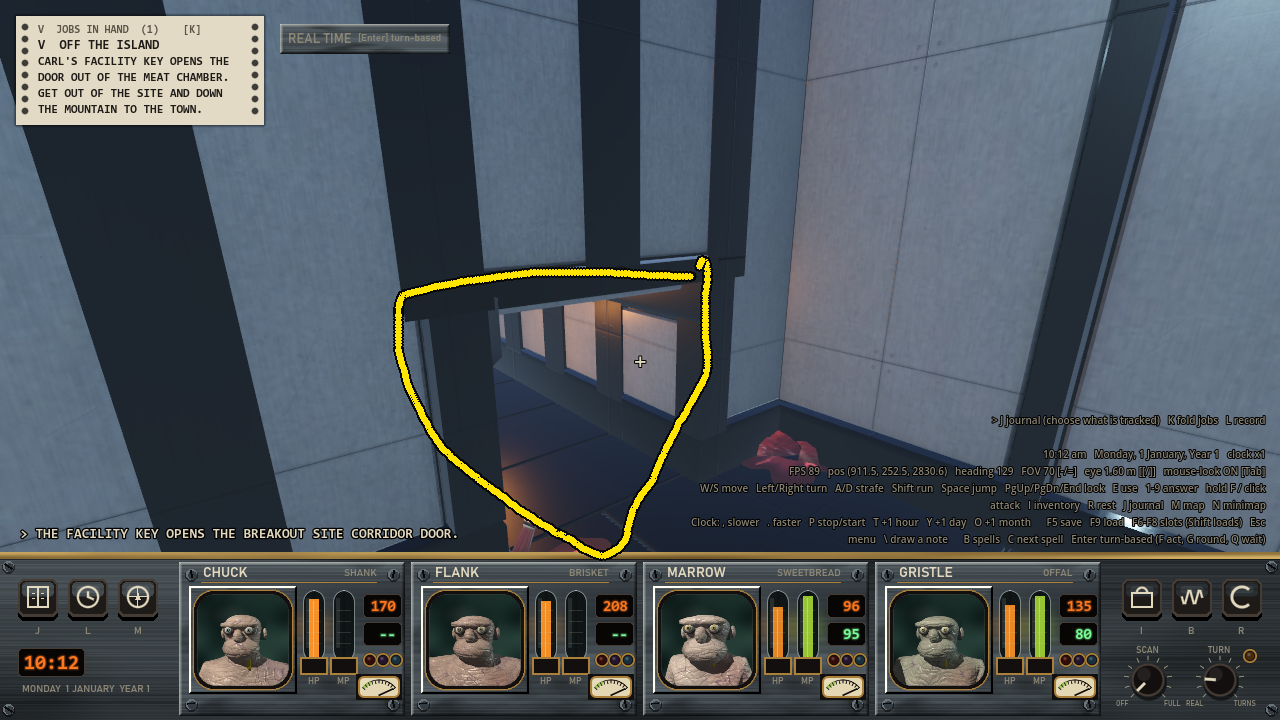
My note on the crawl, asking for a grate over it.
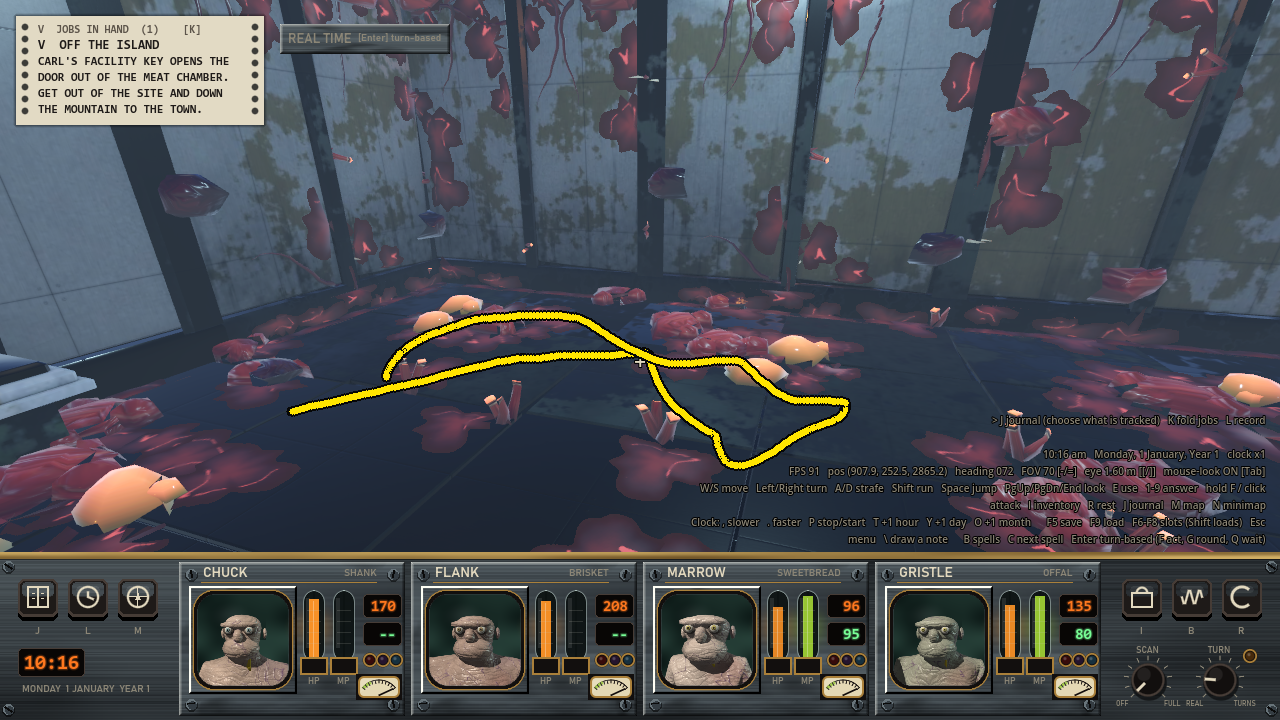
My note on the cells, asking for dead prisoners in them.
Eating is a field on the NPC’s file, eat_as, which names a monster type. The body is worth whatever a kill of that monster is worth, so the number lives in one table. I went with the lowest kill value on the four floors, which is 160 juice, or 40 for each of the four party members. The live prisoner was worth 120 and I raised him to 160 to match. The dead guard and the dead assayist can’t be eaten, because the party has to read what they’re carrying first.
That dead guard was hard to see on dark meat, so a thing in the sheet can now be marked lit. That hangs a spotlight from the ceiling over it, with a 30 degree half angle.
The meat isn’t laid on dug rock yet, and the code that furnishes rooms doesn’t know a dug room from a built one.
Why was the room still bright with the lamps turned down?
The first floor is now lit like a plant where maintenance stopped. All the lamps are dimmer, and they get dimmer the more meat has grown around them. Of the floor’s 88 lamps, 51 are dead, 23 flicker or sag and 14 are steady.
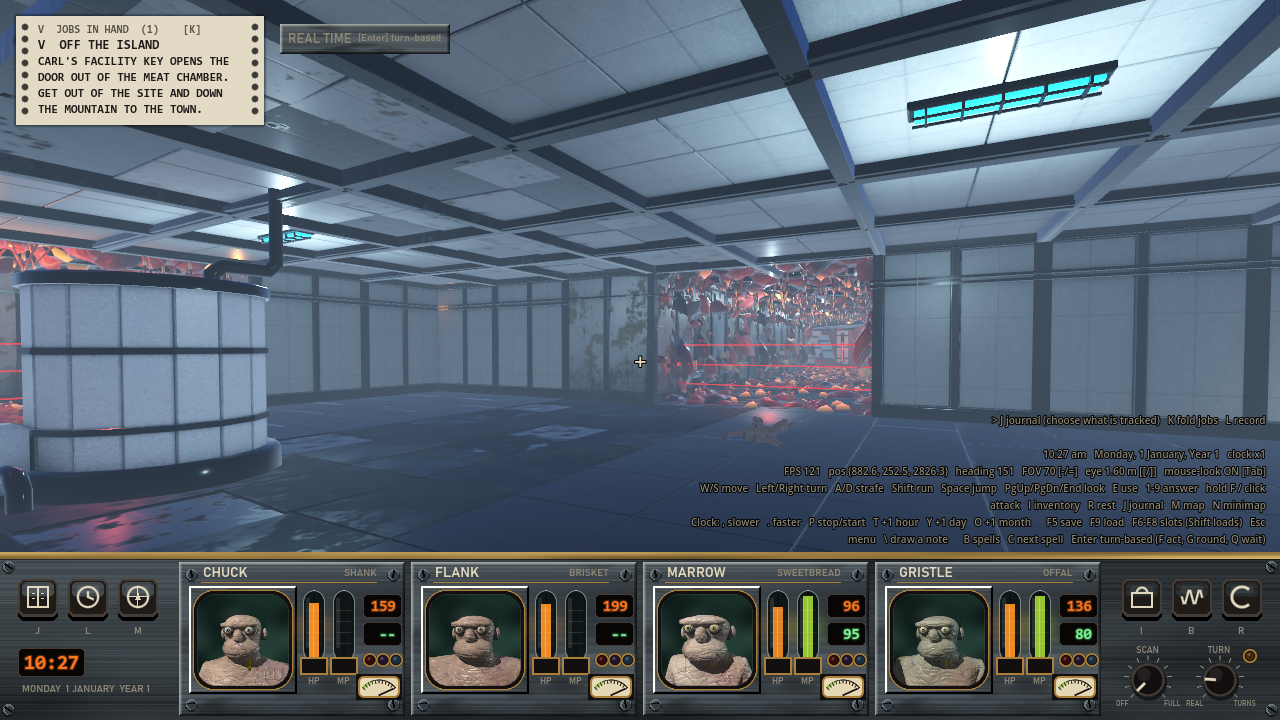
My note, drawn in the juice vat’s room on the old build. Everything is bright and evenly lit.
Most of the light in my picture wasn’t from the lamps. A dungeon doesn’t set any ambient light, so the level’s day-night cycle was lighting it, at 0.4 by day under the island’s sky. Turning the lamps down wouldn’t have changed much. So the rule does two things. It turns the lamps down, and while the camera is inside the floor it holds the sky’s ambient light to 0.3 where there’s no meat and 0.06 where the meat is thick.
A room’s meat is the mean over its squares. I didn’t use the worst square, because nearly every room on this floor has one thick square. A lamp’s energy is multiplied by 0.8 and then by a factor that goes from 1 with no meat down to 0.4 with full meat. The chance that a lamp is dead goes from 0.15 with no meat to 0.85 with full meat.
Left to chance, a room with one or two lamps could end up dark, and my note said the juice vat’s room should stay reasonably well lit. So a room that isn’t thick with meat always keeps the best-rolling share of its lamps alive. I also added 42 spare fittings that never had a lamp, so a clean room can show broken lights without losing one it needs. A spare costs one MultiMesh instance and no light node.
The roll is a hash of the dungeon’s id and the lamp’s square, so the same lamps are broken on every build and after every load, and nothing about them is saved. Flicker and sag are functions of game time only, so they stop when the clock stops. A flickering lamp is mostly on, with a burst of stutters every few seconds. A sagging one sits at 0.6 and swells up and down.
The lamps’ total energy went from 121.8 to 26.9. Dead lamps aren’t built at all, so the floor has 145 OmniLight3D and 34 SpotLight3D nodes where it had 196 and 78. Only this floor uses the rule for now, and I haven’t decided whether floors 2 to 4 should fail too.
One thing looks wrong. The ambient light is one number for the whole picture, so from the bright room the meat through the doorway is lit at 0.3, and then it sinks to 0.06 over a second and a half once I walk in. It looks like eyes adjusting backwards.
Giving each lift stop one door that faces the longest hallway
The lifts were rusty cages with yellow boxes for buttons. Now each stop has walls, one sliding door, a sign over that door, a button plate beside it and a console in the car.
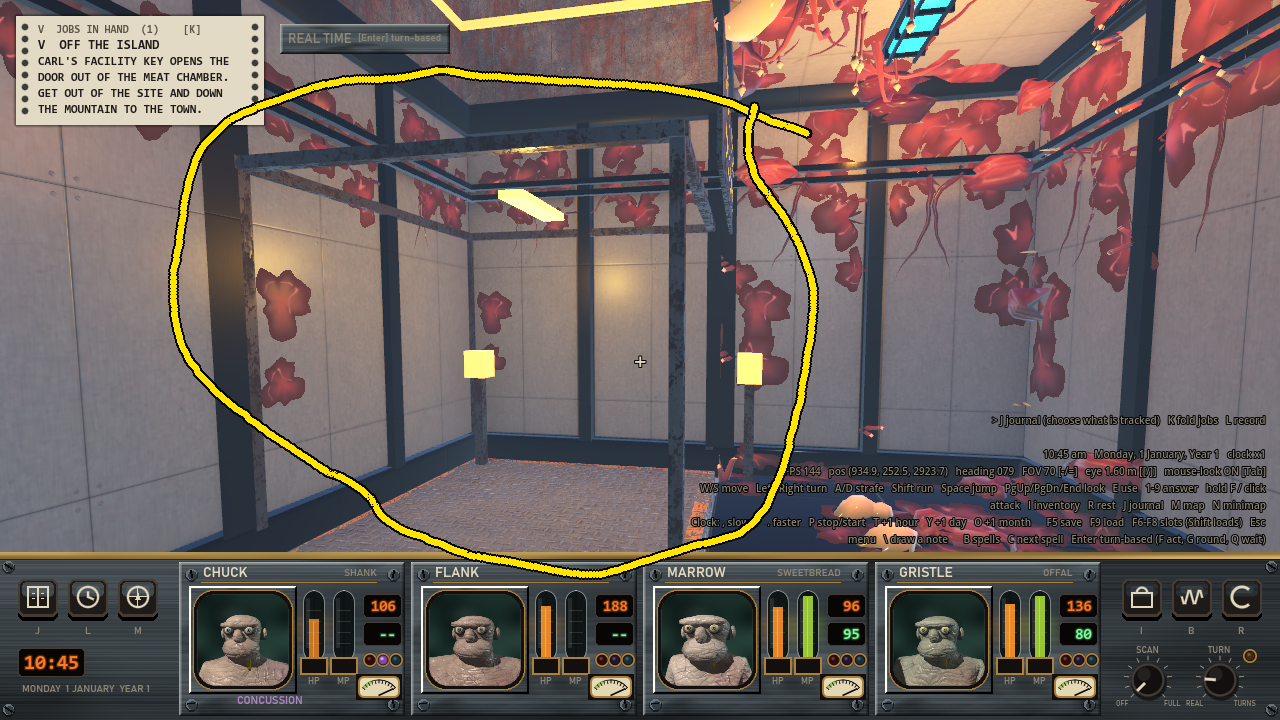
My note on the old lift. It was a bare cage with two yellow boxes on the posts.
The old lifts had one sign per stop, on the first open side. From any other side you saw it edge-on or from behind, which was the wrong-way signs in my note.
The first pass put a door and a sign on every open side. I decided each stop should have one door, in its front, so the other open sides are plain wall now. The front is the open side with the longest straight run of open floor leading away from it. Ties go to north, then east, south and west. On floor 1 that’s west, with a 34 square hallway. Only the stop on the ground needed the tie order.
Each side of a stop is a StaticBody3D wall 0.2 m thick. The front has a doorway 1.18 m by 2.9 m with two leaves that slide into the wall, and it’s solid until the door is fully open. Floor 1 has an interior kit, so its lift wall is built from the kit’s wall pieces placed back to back, with the kit’s narrow door and a lift car the kit already had and I’d never used. Floors 2 to 4 have no kit, so the same shapes are built from the flat plate those floors use.
The door is closed while the car is away or moving. When the car is sent, the door closes first, which takes 0.6 game seconds. I didn’t want the ride to take longer, so the car moves faster to make up the time. The doors aren’t saved. After a load they snap to wherever the car’s saved state says they should be.
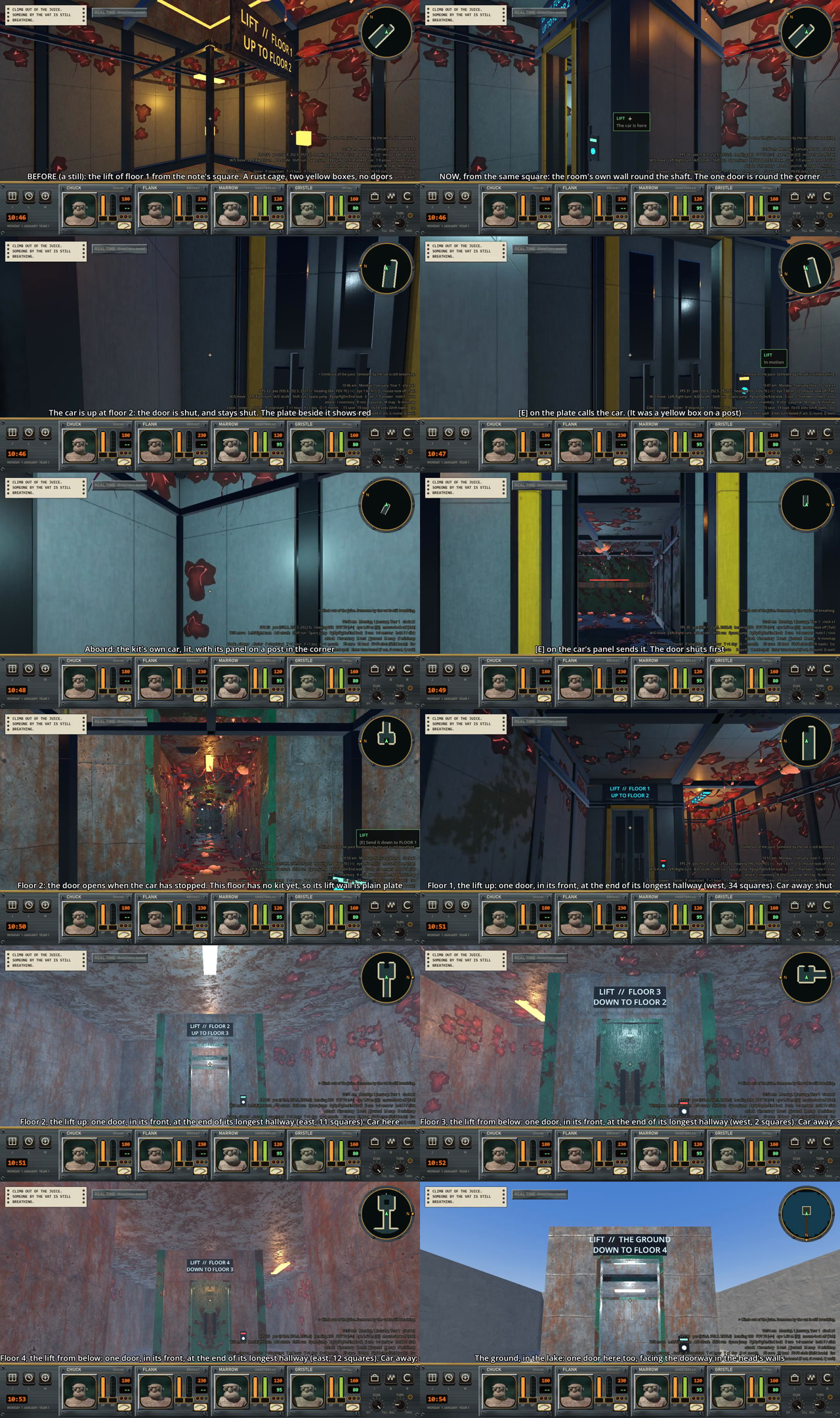
Frames from the film. The last five are stops on floors 1 to 4 and the one on the ground, each seen from its hallway.
A stop has no lamp, only the car does, so with the car away a wall can be dark. The pathfinding and the map also still think a stop’s walled sides are open, so a monster could walk at a wall there. I haven’t fixed either yet.