Rebuilding character creation as five pages in Godot
The surgery's old editor is replaced by one window of tabbed pages built from the inventory screen's kit, driven by mouse, keyboard or controller.
Choosing a puppet at one of the surgery’s four tables is now one window with five pages: PUPPET for the race, IMPRINTING for the class, POINTS for the five stats, SKILL for the one extra skill, and TENANT for the name. It’s built from the inventory screen’s kit and it sits on the right, so the table, the body and the shredder stay in sight on the left. This is the second of four stages, and the words on every page are still placeholders.
I asked for this in the same spec as the surgery: “The character creation should be broken up into multiple subpages and the UI should be redone to match the UI of the inventory system”. The first stage built the room and the flow, but the choosing still happened on the old creation screen, shrunk to 0.75 scale and pushed to the right. I wanted that screen gone.
I had two agents work on it in turn, with a planned handover in the middle. The first wrote the window, the pages and the test. The second took stills of every page, fixed what they showed, and fixed the test’s five failures.
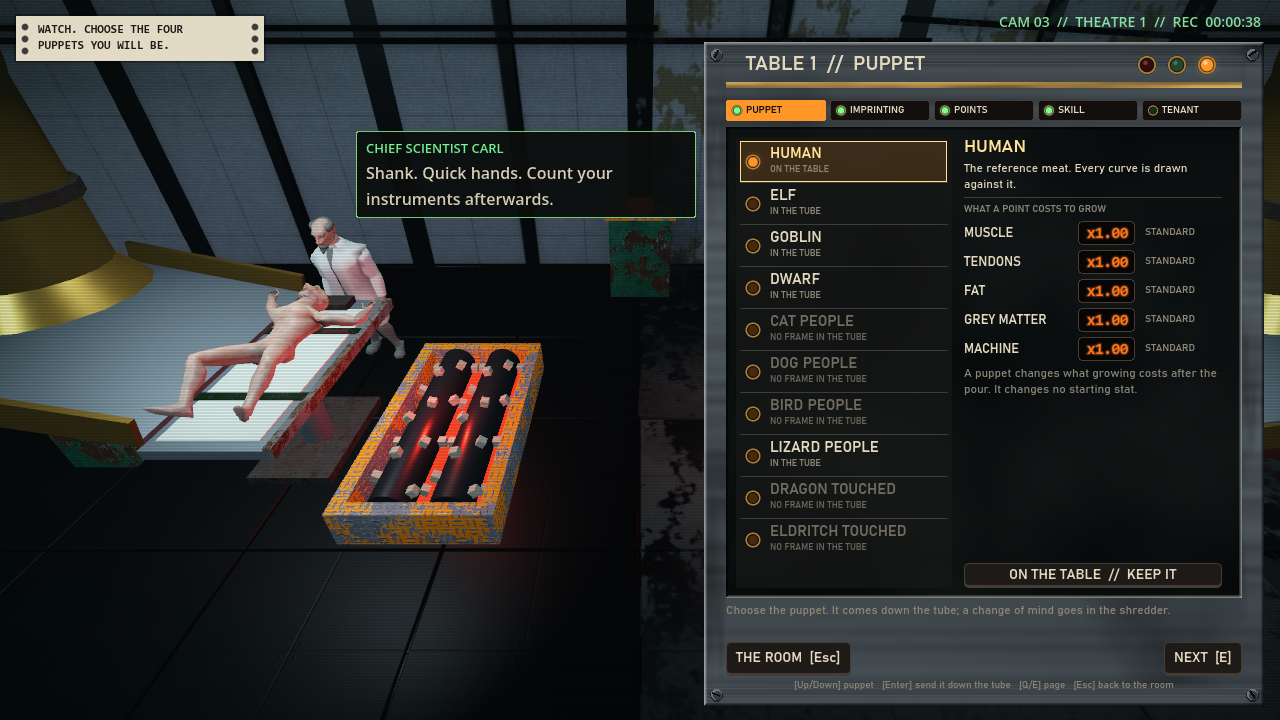
The PUPPET page. The lamp marks the race that’s on the table, and the right side shows what that race does to the price of each stat.
How is the window put together?
The window is a RackWindow, which is the frame the inventory screen uses. It’s anchored to the right edge of the screen at a fixed 560 pixels wide, 16 in from the right, 42 down from the top (the camera’s readout is above it) and 14 up from the bottom. At 1280 by 720 that puts it from x 704 to 1264, so the table gets the 704 pixels to its left.
Inside it there’s a row of five tabs, a recessed panel that holds all five pages with one visible, a status line, and a row of keys: BACK, THE ROOM and NEXT. Each tab has a lamp. It’s amber where you are, green for a page that’s done and gray for one you can’t open yet. Nothing past PUPPET opens until there’s a body on the table.
I didn’t add any font sizes or colors. The pages only use sizes the inventory already uses, the colors come from the same kit, and the numbers are the kit’s readouts and meters.
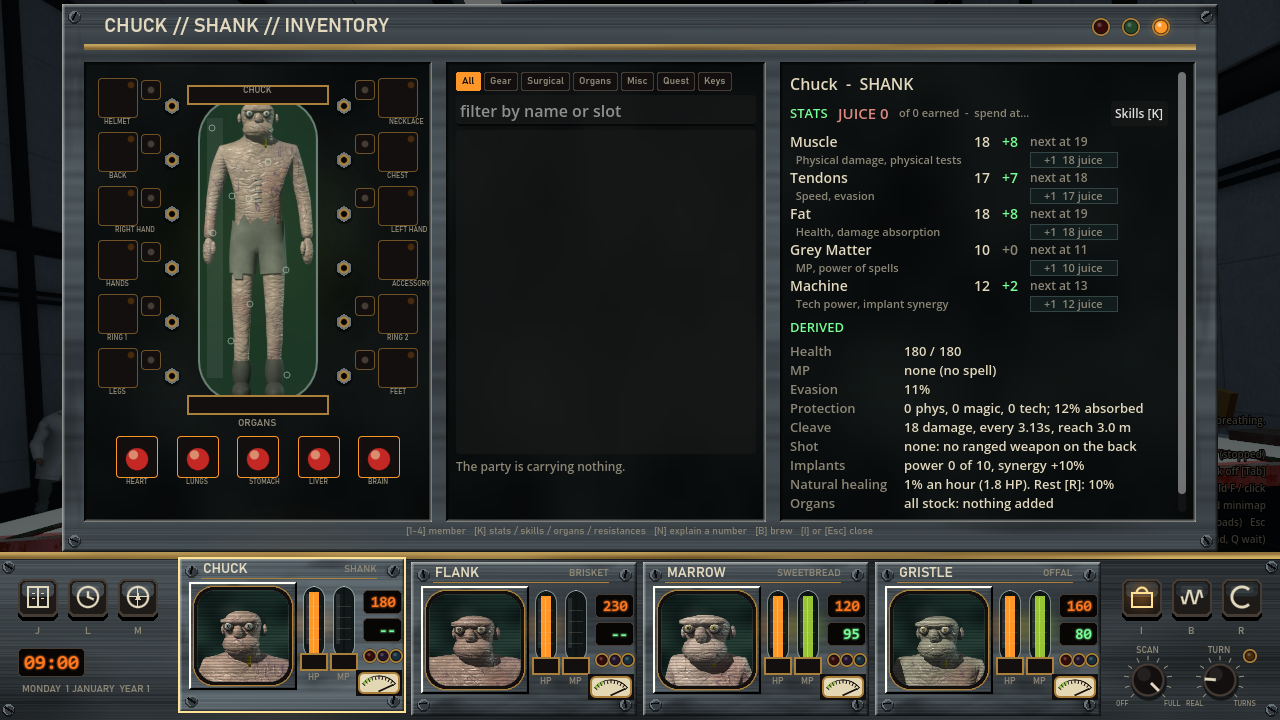
The inventory screen, for comparison. Same frame, lamps and type. Its stats are in mixed case, and I’ve decided they should go to capitals like the pages.
There are eight scripts in scripts/creation/. CreationPages is the window, CreationPage is the base that every page extends, each page has its own script, and CreationList is the list that three of the pages share. The window calls the same few functions on every page:
func id() -> StringName            # its tab, and the key of its words
func refresh() -> void             # draw from the builder as it stands
func entered() -> void             # the page was just turned to
func handle(event) -> bool         # a key the window did not use; true if used
func activate() -> bool            # accept; false means "turn to the next page"
func hints() -> Array[String]      # the hint line, [keyboard, controller]
Adding a page means writing a script on that base, adding a line to the window’s ORDER constant and its list, and writing the page’s words.
Keeping the old rules
I didn’t rewrite the creation rules for this. The old creation screen, PartyBuilder, still holds every rule and every choice, and a page only calls its functions: set_cut, adjust, apply_recommended, strip_points, set_pick and set_member_name. The builder got four small read-only functions for the pages to call and nothing else in it changed.
The race belongs to the surgery scene, because that’s what moves the bodies. The PUPPET page emits race_chosen, the scene sets the race and sends the body down the tube, and it tells the window the tube is running. That sets a busy flag, so nothing can be picked and no page turns until the body lands. Then the window turns to IMPRINTING.
The test checks that the pages are only a new face on the builder. It starts a second new game, makes all four tables with only the keys, and compares JSON.stringify of the four members to what an untouched PartyBuilder makes. They’re equal. It also makes one member with the keyboard, one with the mouse and one with the controller, and each one matches the same calls made on a fresh builder.
Why doesn’t clicking a class pick it?
On the three list pages, a click or the arrow keys only read a row. The row gets an amber frame and its details show on the right. The lamp at the start of a row marks what’s chosen. To take a row you press accept, double click it, or press the lit key under the details.
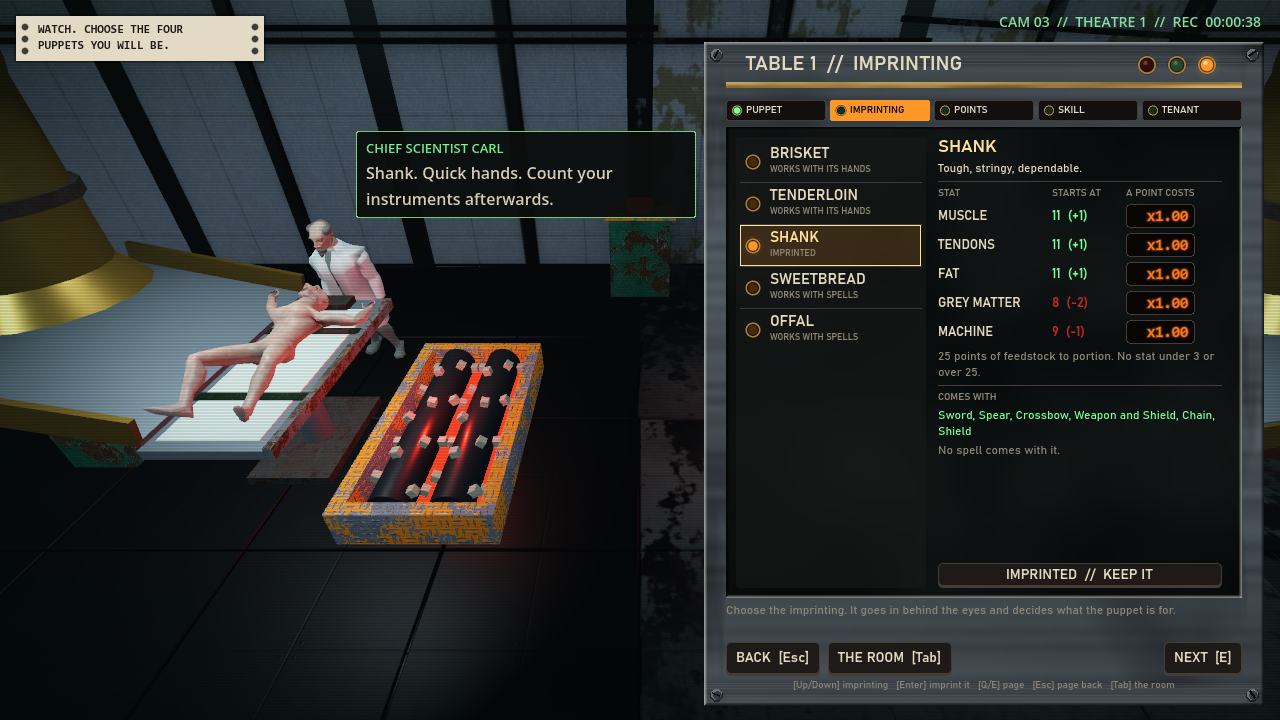
The IMPRINTING page. Shank is imprinted, so its lamp is lit, and the key at the bottom says to keep it.
I split reading from taking because of the class list. Setting a class resets the points to that class’s recommended spread, so if looking at a class picked it, arrowing down the list would throw away your points. Picking a different class also turns off the lamps on the POINTS and SKILL tabs, because both need another look.
Accept on the row that’s already chosen turns the page instead, so Enter, Enter, Enter walks a table through its defaults.
A change of race works the other way. It shreds the body and changes nothing else, and the test checks that the class, points, skill and name are the same afterward.
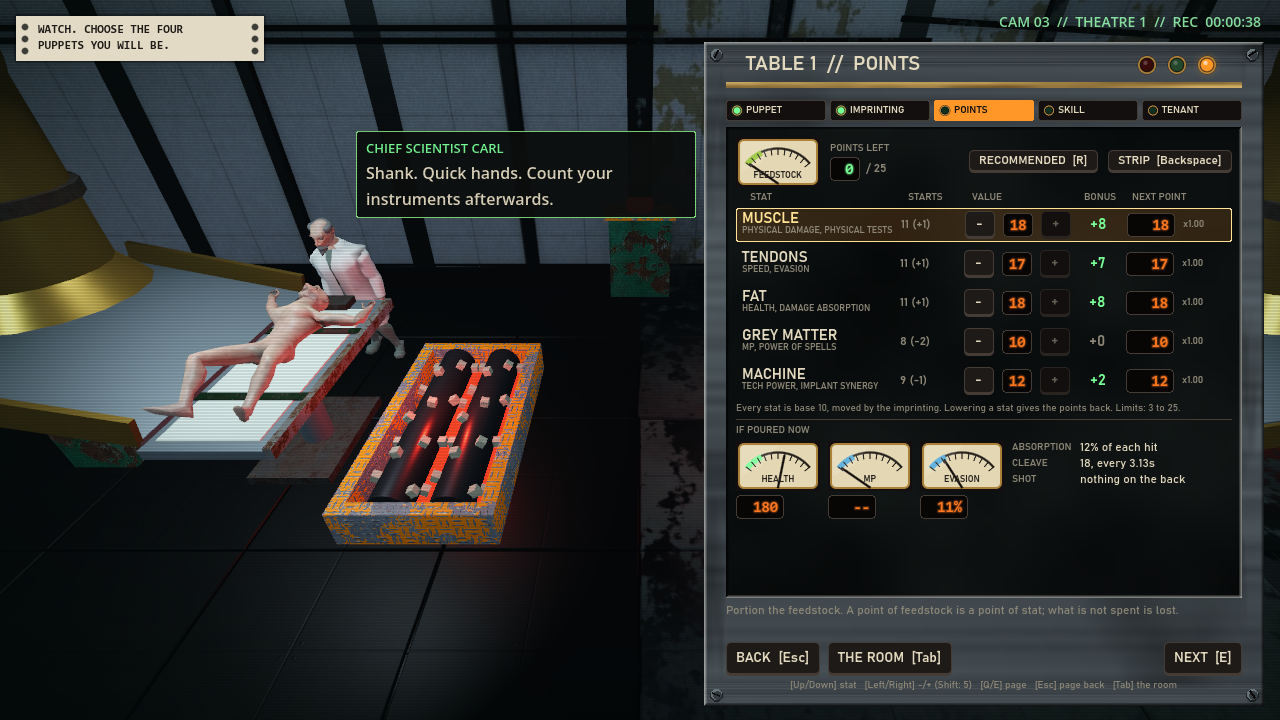
The POINTS page. Each stat row has its starting value, minus and plus keys, the bonus, and what the next point costs.
The list is a Godot ItemList with its text made transparent and a child Control drawn over it. That Control paints each row the way the inventory list paints its rows: a lamp, the name, a small line under it and a word at the right. It never takes keyboard focus. The pages read the keys and tell it to step.
Why did the controller’s name entry fail?
On the TENANT page, the name key opens the on-screen keyboard if you’re using a controller and types into the field if you’re not. With a controller, it didn’t open.
The input autoload, Controls, works out which device you’re holding from the events it sees. But the window reads its keys in _input() and marks them handled, and an autoload is the last node to hear an event. So a pad press that the window used never reached Controls, and “using a pad” stayed false. The fix is at the top of the window’s _input(). A pressed pad button tells Controls it’s a pad, and a pressed key or mouse button tells it it isn’t.
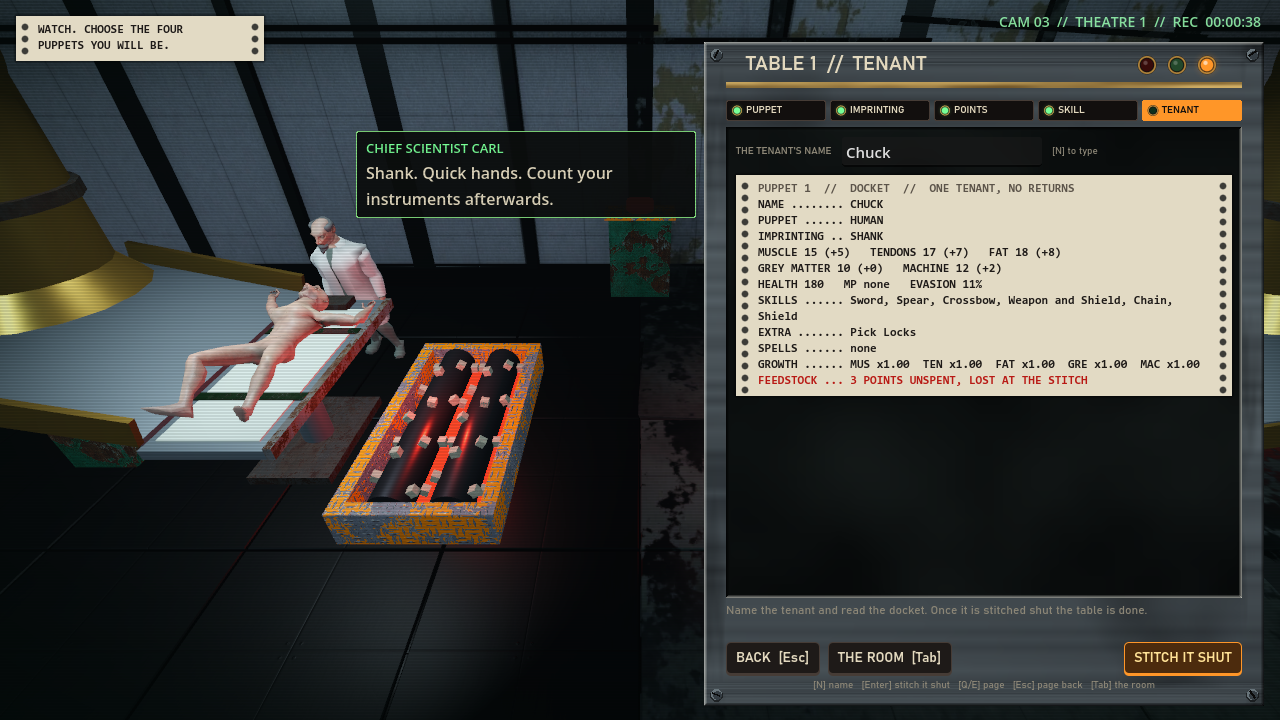
The TENANT page. The docket prints the whole puppet, with a red line when points are unspent. The empty space under it still needs something.
The window adds a “creation” context to Controls with four actions: Q or LB for the page before, E or RB for the page after, N or Back to name the tenant, and Tab or Y to go back to the room. Start jumps to TENANT and then confirms. Confirming warns once if points are unspent, and a second press goes through.
Why did the fit checks pass on a window nobody will see?
A headless Godot run here has a screen of 1280 by 1280, not 1280 by 720. The window is anchored top and bottom, so in the test it was 1,224 pixels high and every “does this page fit” check passed. The test now sets the root’s size to 1280 by 720 before anything else, and the fit checks mean that size.
The stills caught three more small things. Carl’s speech bubble ran under the window, so it’s kept to the left of it now. The word at the right of a list row was cutting off the small line under the name, so it moved up beside the name. And the POINTS hint ran to two lines.
Where does a table reopen?
The window remembers, for each table, the last page past PUPPET that you turned to, and it reopens there. Cancel steps back one page at a time, so a table you leave with cancel has always just passed through IMPRINTING, and that’s where it reopens. I added a third key, THE ROOM, that leaves from any page. Leave from POINTS with it and the table reopens on POINTS.
What’s left?
A test of mine scans game scripts for raw input, like key codes and pad buttons, and fails on any file that isn’t in its table of named exceptions. The new scripts failed it, and three exceptions were added, each with its reason: the window for text entry and for telling Controls the device, the POINTS page for a click on a stat’s row, and the surgery scene for a click on a table through the camera.
The pages test has 180 checks passing at 1280 by 720 and takes about 5 minutes. At the handover it was at 165 passing and 5 failing. The run after merging was 24 tests with none failing.
When I saw the film and the stills I said to land it and mend small things after. All 68 strings in the window are placeholders in content/creation.json for me to rewrite. I haven’t checked any size other than 1280 by 720. The Meat Machine and the capitals are done, and the rebinding screen warns now (the section below). Next it’s the room’s real models and then the clips and sounds.
Why doesn’t the Meat Machine make characters anymore?
The Meat Machine in the bay used to open the old four-member creation screen. When I saw the new pages I told the agent: “The meat machine shouldn’t create characters at all anymore or at least not be triggera Le to do so by the player”. Now when you use it, it says a line for four seconds and opens nothing. A spent machine says “The hopper is scraped clean. It has nothing to pour, and nobody to pour it for.” There’s one line each for a machine with no power and a powered one with nothing to make.
A game that starts in the bay itself now wakes with the default four party members already made, so the Carnisseur’s lines about waking the machine are never heard. I kept them anyway, in case something reaches them later. The old four-member screen is only reachable for a dungeon that doesn’t name a surgery, which a player can’t get to.
The other mends were small. I’d typed “Make both capitals”, so the inventory’s stat names, skill, organ and resistance names are in capitals like the pages, and the numbers and small notes are the same as before. For the rebinding screen, Controls has a new ALSO_READS table that lists five of the old screen’s keys that the POINTS and TENANT pages also read, so binding a creation key onto one of them is now flagged as a clash. The heading over those keys changed from “Meat Machine” to “The surgery”. A test that expected 217 rocks on floor 1 now expects the 226 that are there, and the surgery film’s captions moved clear of the window. I ran 20 tests by name on the merged result and none failed, but I haven’t run the whole suite.