Drawing dungeon maps at import and moving fixtures into a table
Every dungeon import now draws a 5 to 14 KB map of each floor, and a new door or grate is seven lines of JSON instead of a worker's code.
Two of the ideas from the dungeon review are built. Every dungeon import now draws each floor from above, and the kinds of fixture a sheet can hold are rows of a JSON table instead of code. The Breakout Site plays exactly as it did before.
Why were dungeons so expensive to check and extend?
The review counted 609 pictures read in six days of dungeon work. Each new kind of fixture (the sheet things, the laser walls, the lifts, the choke) had also been its own worker, at 1 to 3 M tokens each. I picked these two from the review’s list of eight, and I wanted a dungeon checked with one picture and one short file, and a new window or grate to cost a row and a model.
How does the import draw a floor?
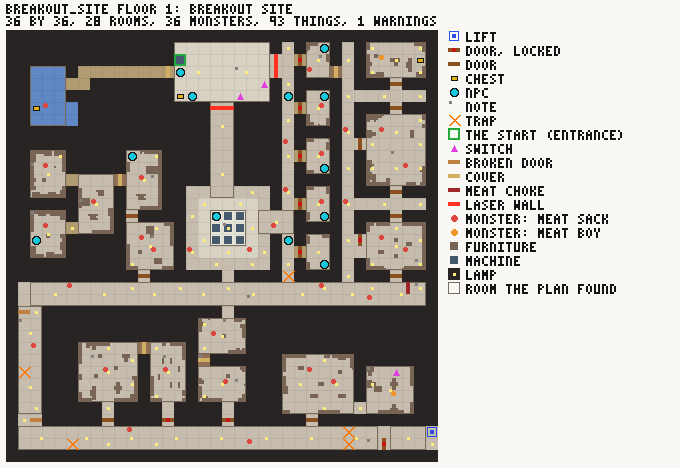
Floor 1 of the Breakout Site as the import draws it: 680 by 468 px, 14 KB.
The map is drawn in GDScript when the dungeon is imported, by a new class, DungeonMap. A square is 12 px. Rock is dark, floor is shaded by its ceiling height (low is darker, caverns are paler), water is blue, and the rooms the plan found are outlined. On top of that every thing in the plan is marked by kind. Doors and fixtures that stand across the way are a bar across their square, and a fixture takes its color from its row. A pack is one dot per monster, colored by the monster’s kind. A legend on the side lists only what is on that floor.
I did it in GDScript and not in a Python tool reading an exported JSON, because the plan already has everything worked out: a door’s span, the squares of a laser wall, the furniture the dresser lays. A second reader would have to work those out again, and this way every import gives the pictures with no extra step. The old tools/monster_census_map.py stays, because it shows where monsters are in a running game, which a plan can’t know.
The text on the picture uses a pixel font I put in the class. It’s 3 by 5, and each glyph is five rows of three bits stored as an octal string, so "A" is "25755". That means it draws in a headless run with no engine font. With flat colors and no anti-aliasing the Breakout Site’s floors are 14, 5.4, 5.7 and 4.9 KB.
Beside the full report there’s now a summary. For each floor it gives the size, rooms, lamps, thing counts by kind, monster counts by kind, furniture, and counts of warnings and unhandled notes, then the first few warnings. The Breakout Site’s is 1.9 KB, against 63 KB for the report. A test, tests/dungeon_maps, checks the summary’s counts against the plan’s own for every dungeon, and it passes 101 checks.
How do fixtures become rows?
Each fixture kind used to be a branch in DungeonFixtures and DungeonBarrier. Now each is a row of content/fixture_kinds.json, keyed by the sheet’s thing type. A row says what code works it (does), its model, whether it stands across the way, along a stretch or against a wall, whether it stops bodies, and what it lets through: walkers, flyers, sight and shots. It also says what interact does (look, say, throw, take_off or none), the line it shows, the line it writes to the event log, its name, and its color on the map.
I moved the seven existing kinds over one at a time and compared the import report after each. Every dungeon’s report is byte-identical to before.
A row whose does is barrier is all there is of that kind, so adding one needs no code. The first is the welded door, which uses a door-leaf model that was already in the game:
"welded_door": {
	"does": "barrier", "model": "res://assets/models/interiors/SM_interior_doorleaf_cyberpunk_decayed.glb", "footprint": "across", "solid": true,
	"lets": {"walkers": false, "flyers": false, "sight": false, "shots": false}, "depth": 0.2,
	"interact": "say", "line": "// WELDED SHUT. FROM THIS SIDE.",
	"log": "The door is welded along every seam. Someone on this side wanted the other side kept there.",
	"name": "Welded door", "word": "welded door",
	"built": "a door welded shut, {wide} m wide and {high} m high: not seen through, not passed, not shot through", "map": "#5a6a78"
}
The model is loaded, fitted to the width and height of the way, and given a box 0.2 m deep that stops bodies. It stops walkers, sight and shots, and pressing interact writes its log line. DungeonFixtures.table_problems() checks every row and returns a line for each one that’s wrong, such as an unknown does, or a barrier row with an empty model, line or map. tests/fixture_rows holds it to none and passes 57 checks.
Two things are left. The phone designer page doesn’t offer row kinds yet, so a sheet gets one through its added list. And a kind with state, or one that’s strung along a stretch like the laser wall, is still code.