Aging a building from per-instance numbers on one shader
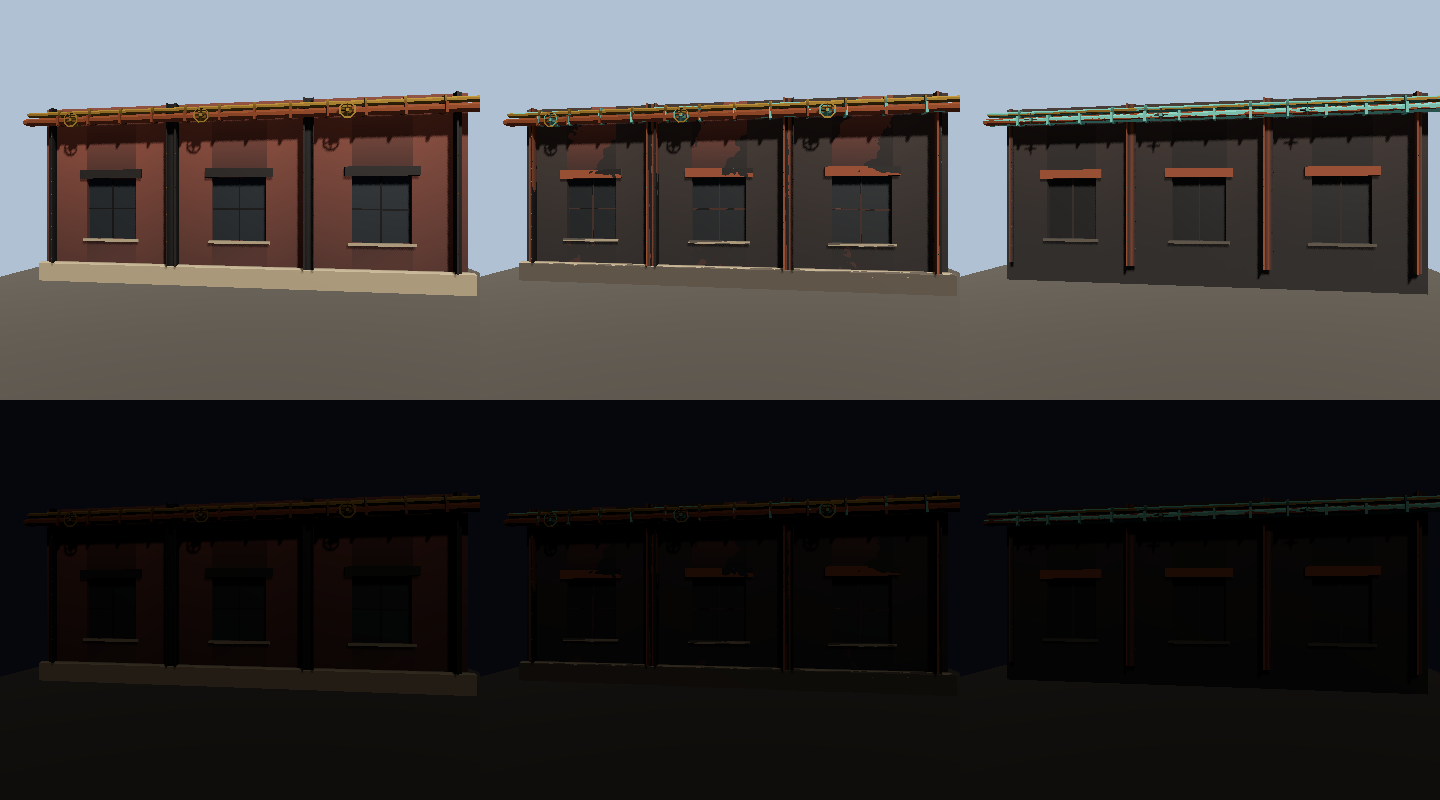
Wear, grime, missing parts, tint and night glow are packed per instance, so one material shows a building new or decayed. It isn't placed in the world yet.
Buildings have a shader now. One material gives a building its look, and how old it is comes from a few numbers stored on each instance: wear, grime, how much is missing, tint, glow at night, a thin meat stain and moss. Nothing is placed in the world yet, and I still owe a film and the judge’s sheet of six looks, which come after the building pieces are installed.
Why share the dungeon’s projection?
I’d asked for a generator that can build buildings, and proof that it does, but not to place them in the world yet. The pieces come out of the art kit as plain geometry. The game’s side is how they look, and I wanted one shader to show peak, declining and decayed without a material per state.
The dungeon already paints its floors and walls with its own projection, so I moved that code out of a GDScript string into painted_projection.gdshaderinc and made both the dungeon and the building shader include it. To check the dungeon hadn’t changed I rendered a fixed camera on a painted floor and a wall before and after. 0 of 76,800 pixels differed. As a control, shifting the projection by half a meter changed 15,675 pixels, so the compare can see a change.
How do the numbers get to the shader?
Each instance carries its numbers in INSTANCE_CUSTOM as 16-bit halves. The pairs are wear and grime, missing and seed, hue and value, and glow with the meat and vine bytes. building_look.gd packs them, the shader unpacks them, and the test checks the two agree. A building that’s the only one of its mesh uses an instance uniform instead, and -1 in the first slot tells the shader to read the uniform.
Parts that fall off are marked by the vertex colors the pieces already carry, as break groups. The vertex shader compares each group’s seeded value against the missing number and collapses the group’s vertices to a point, so a part disappears without changing the mesh. The test reads a piece’s mesh back and checks the share that collapses at missing 0, 0.33 and 1.0.
How does wear stay one building getting older?
Wear comes from three FastNoiseLite textures made at runtime and sampled in world space, so neighboring pieces line up. A fragment is worn when the wear number passes this threshold:
threshold = UV2.x + 0.35 * (noise - 0.5) - 0.15 * edge - 0.1 * crevice
Every state uses the same noise, so the thresholds nest. A spot that’s worn at declining is still worn at decayed, and the three states look like one building getting older, not three different ones.
My first noise was too strong and wore the walls in big dark blotches that looked like camouflage on a large flat face. I had listed that as a risk in the plan. Centering the noise fixed it.
What else does the shader do?
Slates are drawn on faces where the roof tilts between 0.26 and 0.97 up. Glass keeps its base color and darkens with wear, so no opening is ever lighter than the wall by day. At night, from 19:00 to 05:00 on the game clock, the glow number lights the building and flickers it.
What went wrong?
The editor and the game gave different answers. The editor runs a script’s static initialisers only when the script is marked @tool, and BuildingLook wasn’t. A test that compares the editor’s answers with the game’s caught it, and marking the script @tool fixed it.
I’m not happy with the look at declining yet. Most of the brick is soot, so it looks like a dark repaint and not as time passing. The judge rules on it after the install.
Numbers
The test passes 66 of 66 headless and 81 of 81 in a window. The commit added 1,152 lines across 15 files: a 234-line shader, a 267-line building_look.gd and a 489-line test.